No A2 Models
TONE3000

PARAMETRIC NAM A2 PREVIEW (use slim as gain param)

Full Rig / Combo Capture

NAM

furakutaruwamugennikurikaesaremasu's avatar

furakutaruwamugennikurikaesaremasu

7 hours ago

Description

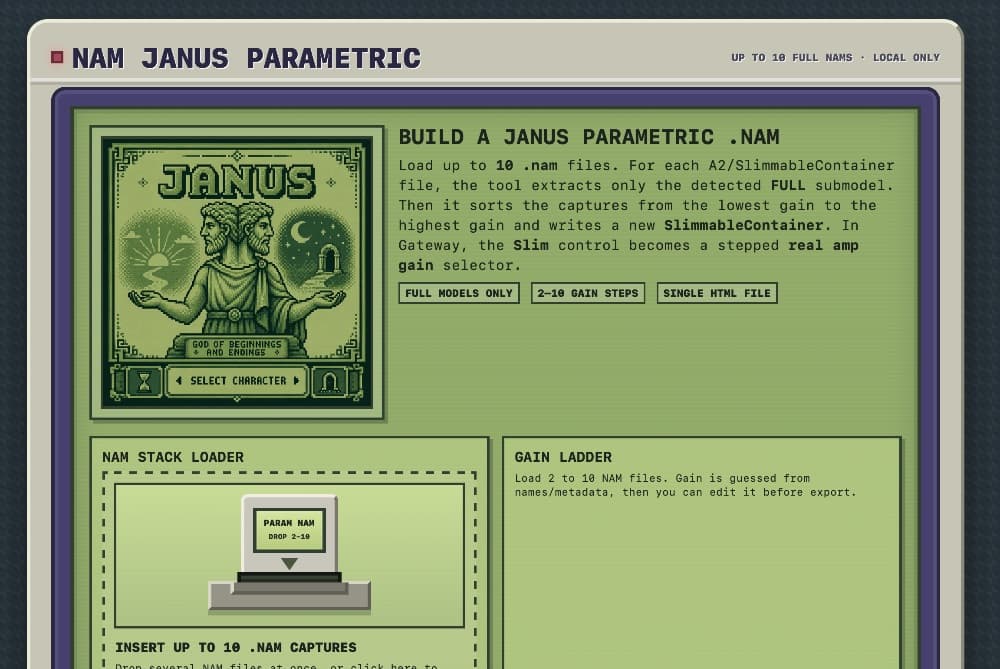
https://youtu.be/jxr4ZrlMjfI?si=NetnPaN9fJmUvB0c NAM Janus Parametric NAM Janus Parametric is a small local browser tool designed to build a “real amp gain” style `.nam` file from several existing NAM captures. Instead of blending models, the tool creates a slimmable NAM container where each position of the Slim control selects a different FULL NAM model. This makes the Slim knob in the NAM Gateway plugin behave like a stepped gain selector: low gain on the left, higher gain on the right. What it does You can load up to 10 `.nam` files, ideally captured from the same amp, cab, mic and setup, but at different gain levels. For each loaded file, the tool keeps only the FULL model: If the file is an A2 slimmable NAM, only its FULL submodel is used. If the file is a regular non-slimmable NAM, it is treated as a FULL model. LITE models are ignored. The models are then sorted from the lowest gain to the highest gain and exported as a new Janus Parametric `.nam` file. How to use https://drive.google.com/drive/folder... 1. Prepare several NAM captures of the same amp at different gain settings. 2. Open the Janus Parametric HTML file in your browser. 3. Drag and drop your `.nam` files into the loader, or click the loader to select them. 4. Check the Gain Ladder on the right. 5. Edit the gain numbers if the automatic order is not correct. 6. Make sure the order goes from clean / low gain at the top to high gain at the bottom. 7. Choose an output name. 8. Click the export button to download the new `.nam` file. 9. Load the exported file in the NAM Gateway plugin. 10. Use the Slim control as a stepped “real amp gain” knob. Important note The Slim control does not morph or interpolate smoothly between captures. It selects one FULL model at a time, using gain steps inside a slimmable NAM container. For the best result, use captures made with the same amp, cabinet, microphone, interface level and settings, changing only the real amp gain between captures. Disclaimer This tool was vibe-coded with ChatGPT and tested on my own computer. It is provided as an experimental utility only. Use it at your own risk. The author makes no guarantee that the generated `.nam` files will work correctly in every version of NAM, NAM Gateway, or any other compatible plugin or host. Always keep backups of your original `.nam` files. https://drive.google.com/drive/u/2/folders/1K9EtrdXuMlI8G0VtQ2eFbZHqkFebcEy3

Makes and Models

VOX AC30

Preview

Models

Each model captures the gear at specific knob settings.

CustomESR: —

1 Comment

Share your thoughts...
@username to mention • Ctrl+Enter to submit
It doesn't sound like a Vox AC30 (maybe you made a typo) at all, but sounds awesome, thanks.
0

License: T3K

Users may download and use the data file in software and publish the resulting outputs without royalties or restrictions. However, they may not upload, republish, or distribute the data file without the author's permission.
Use Your Tones

Load NAM files and IR's from TONE3000 onto a free plugin or compatible pedal.

Plugins

TONE3000 Digital Models

NEW TO TONE3000?

Discover hyper-realistic digital models of iconic gear, including the Fender Twin Reverb, Vox AC30, Marshall JCM 800, and thousands more. Getting started is easy—and free!